
Website speed plays a critical role in Google rankings. No matter how SEO-optimized or visually appealing your website is, if it loads slowly, it will struggle to rank in search results. A slow-loading website negatively affects user experience, increases bounce rate, and signals poor performance to search engines. Google prioritizes fast, user-friendly websites, and without proper speed optimization, your site may never appear on top pages.
That’s why improving website performance and loading time is not optional it is essential. In this guide, I’ll share a practical solution based on real experience. If you are a beginner struggling with website speed issues, this article is specifically written to help you fix the problem step by step.
I will introduce a powerful WordPress plugin that can significantly improve your website speed after installation and activation. You don’t necessarily need the paid version even the free version can deliver noticeable results when configured correctly. This is not a promotional article; it’s based on hands-on experience to help beginners improve performance without unnecessary expenses. So keep reading as we move forward with the exact steps to boost your website speed.
10Web Booster – Improve Website Speed in Minutes
If you are using WordPress and struggling with slow loading time, 10Web Booster can be a simple and powerful solution. It is a website speed optimization plugin that helps improve performance, caching, and Core Web Vitals without complicated technical setup.
How to Install 10Web Booster
Follow these simple steps:
-
Go to your WordPress Dashboard
-
Click on Plugins → Add New
-
Search for 10Web Booster
-
Click Install
-
Click Activate
- That’s it.
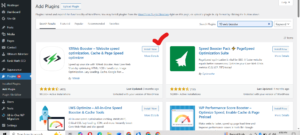
For beginners, this process is very easy. After activation, the plugin starts optimizing your website automatically. When your website loads faster, your chances of ranking higher in Google also improve because speed is a major ranking factor.
Why Website Speed Matters for Ranking
Google clearly prioritizes fast websites. According to industry data:
-
If a mobile website takes more than 3 seconds to load, more than half of visitors leave.
-
Websites with slow loading times lose conversions and engagement.
-
Faster landing pages generate better results and ROI.
Google measures speed using tools like:
-
PageSpeed Insights
-
Core Web Vitals (LCP, FID, CLS)
-
Google Lighthouse
A good PageSpeed score is usually above 90. Most websites score between 40–50, which means they need improvement. That’s where plugins like 10Web Booster help.
Key Features of 10Web Booster (Free Version)
The free version is powerful enough for beginners. It includes:
1. Caching
The plugin stores a cached version of your pages. This reduces server load and makes your website load much faster for visitors.
2. Image Optimization
Large images slow down websites. 10Web Booster compresses images, resizes them properly, and converts them into WebP format for faster loading.
3. Lazy Loading
Images, videos, and iFrames load only when users scroll to them. This improves Largest Contentful Paint (LCP) and overall performance.
4. Minification of CSS, HTML & JavaScript
The plugin removes unnecessary spaces and code to reduce file size. Smaller files load faster.
5. Defer Non-Critical Resources
It delays non-important scripts and loads important content first. This improves user experience and speed scores.
With these optimizations, many websites achieve 90+ PageSpeed scores using just the free version.
What About 10Web Booster Pro?
The Pro version includes backend optimization and advanced hosting features. It improves:
-
Server response time (TTFB under 200ms)
-
Database performance
-
PHP execution speed
-
Overall WordPress admin performance
However, if you are a beginner, the free version is enough to significantly improve website performance and speed using plugins without spending money.
Best Practices for Maximum Speed
Even after installing the plugin, follow these additional tips:
-
Use a lightweight theme
-
Avoid installing too many plugins
-
Optimize images before uploading
-
Use proper font sizes for better readability
-
Keep your WordPress and PHP version updated
Remember, speed optimization is not about installing 10 plugins. Sometimes, one well-configured plugin is enough.
FAQs
1. Is 10Web Booster free to use?
Yes, 10Web Booster offers a free version that includes frontend optimization, caching, image optimization, lazy loading, and Core Web Vitals improvements. For most beginners, the free version is enough to improve website speed significantly.
2. Will improving website speed help my Google ranking?
Yes. Website speed is a confirmed Google ranking factor. Faster websites provide better user experience, lower bounce rates, and improved Core Web Vitals scores all of which help in ranking.
3. Do I need multiple speed optimization plugins?
No. Installing too many optimization plugins can create conflicts and slow down your website. It’s better to use one reliable plugin like 10Web Booster and configure it properly.
4. How can I check my website speed after optimization?
You can test your website speed using tools like Google PageSpeed Insights or Lighthouse. Aim for a score above 90 for best performance results.
5. Does image optimization really improve speed?
Yes. Large images are one of the biggest reasons for slow websites. Compressing and converting images to WebP format can dramatically reduce loading time.
Final Words
If your website is slow, do not panic. Install 10Web Booster, activate it, and test your speed again in PageSpeed Insights. Beginners can see noticeable improvements quickly.
And if this guide helped you improve your website performance and speed, don’t forget to say thanks in the comments. Your brother always brings practical and experience-based solutions to help you grow online.